
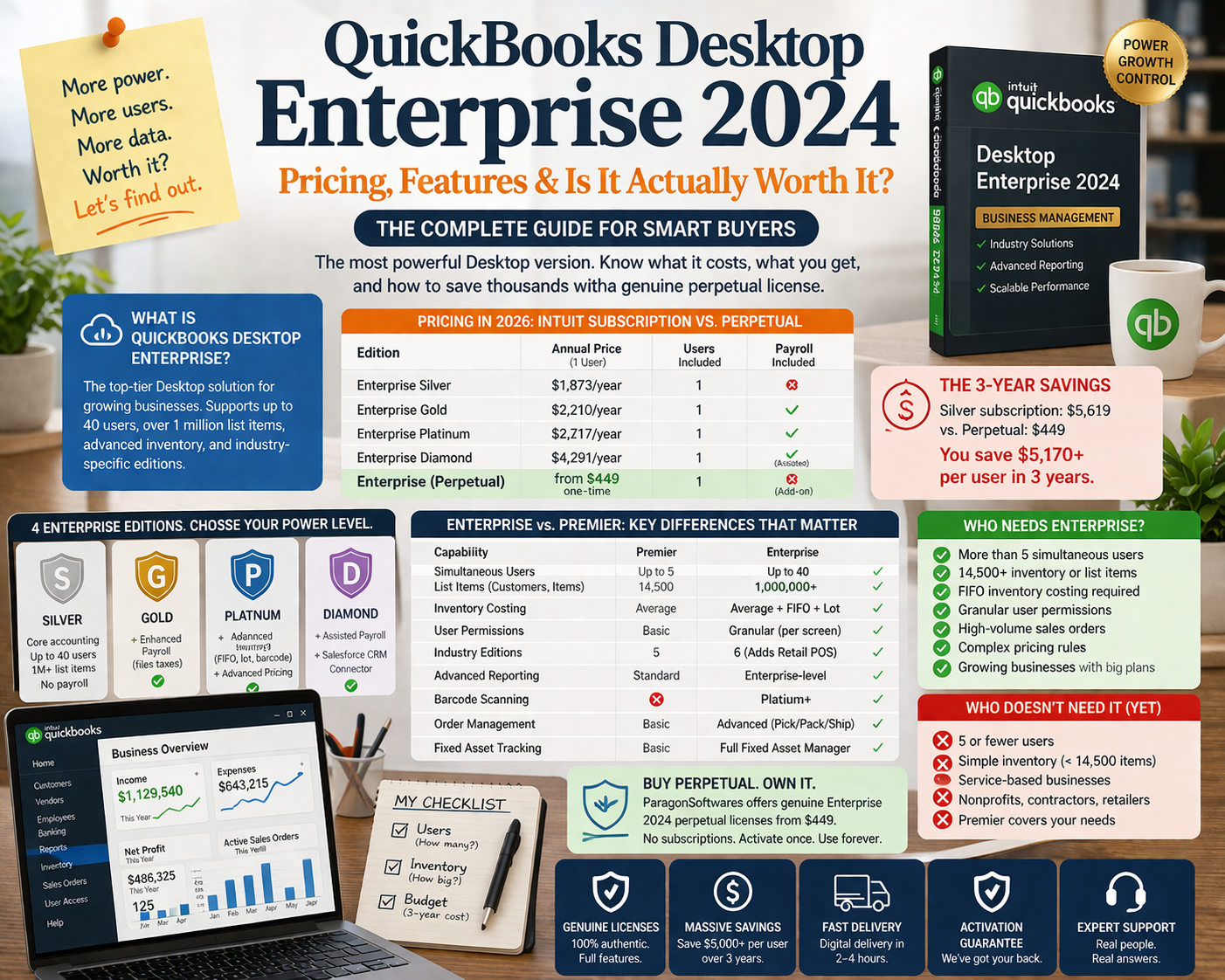
QuickBooks Desktop Enterprise 2024: Pricing, Features & Is It Actually Worth It?
A complete breakdown of QuickBooks Desktop Enterprise 2024 — what it costs through every channel, what features justify the price over Pro and Premier, and how to get it significantly cheaper through the legitimate surplus market.
QuickBooks Desktop Enterprise is the most powerful version of QuickBooks Desktop — and also the most expensive. With Intuit’s 2026 pricing pushing Enterprise Gold to $2,210 per year for a single user, many small and mid-size businesses are questioning whether Enterprise is genuinely necessary for their situation, or whether they are paying a significant premium for features they will never use.
This guide answers both questions honestly: what Enterprise actually offers that Pro and Premier don’t, and how to acquire a genuine Enterprise license at a fraction of Intuit’s current pricing.
📋 Table of Contents
- What Is QuickBooks Desktop Enterprise?
- QuickBooks Desktop Enterprise Pricing in 2026
- Enterprise Editions: Silver, Gold, Platinum, Diamond
- Enterprise vs Premier: What You Actually Gain
- Who Actually Needs Enterprise?
- Who Doesn’t Need Enterprise
- Buying Enterprise as a Perpetual License
- Frequently Asked Questions
1. What Is QuickBooks Desktop Enterprise?
QuickBooks Desktop Enterprise is Intuit’s top-tier Desktop accounting platform, designed for businesses that have outgrown Pro or Premier’s capabilities. It supports up to 40 simultaneous users, handles over 1 million list items (customers, vendors, inventory items), offers advanced inventory management, and includes industry-specific editions not available in lower tiers.
Unlike QuickBooks Desktop Pro and Premier — which Intuit stopped selling to new US customers in 2024 — Enterprise is still sold directly by Intuit as an annual subscription. It is also available as a genuine perpetual license through the secondary software market.
2. QuickBooks Desktop Enterprise Pricing in 2026
Intuit’s Enterprise pricing has increased substantially. Current pricing as of February 2026:
| Edition | Annual Price (1 user) | Users Included | Payroll Included |
|---|---|---|---|
| Enterprise Silver | $1,873/year | 1 | No |
| Enterprise Gold | $2,210/year | 1 | Enhanced Payroll |
| Enterprise Platinum | $2,717/year | 1 | Enhanced Payroll + Advanced Inventory |
| Enterprise Diamond | $4,291/year | 1 | Assisted Payroll + Salesforce CRM |
| Enterprise (perpetual, ParagonSoftwares) | from $449 one-time | 1 | No (separate add-on) |
🚫 The subscription math: At Intuit’s Silver pricing, a single Enterprise user pays $1,873 in year one, $1,873 in year two, $1,873 in year three — a 3-year total of $5,619. A genuine Enterprise perpetual license from ParagonSoftwares costs $449 once. The 3-year saving is over $5,100 per user. For a 3-user team, that’s over $15,000 saved.
3. Enterprise Editions: Silver, Gold, Platinum, Diamond — What’s Different
| Feature | Silver | Gold | Platinum | Diamond |
|---|---|---|---|---|
| Core accounting | ✅ | ✅ | ✅ | ✅ |
| Up to 40 users | ✅ | ✅ | ✅ | ✅ |
| 1M list items | ✅ | ✅ | ✅ | ✅ |
| Advanced reporting | ✅ | ✅ | ✅ | ✅ |
| Enhanced Payroll | ❌ | ✅ | ✅ | ✅ |
| Advanced Inventory (FIFO, lot tracking, barcode) | ❌ | ❌ | ✅ | ✅ |
| Advanced Pricing (price rules) | ❌ | ❌ | ✅ | ✅ |
| Assisted Payroll (Intuit files taxes) | ❌ | ❌ | ❌ | ✅ |
| Salesforce CRM connector | ❌ | ❌ | ❌ | ✅ |
For most businesses evaluating Enterprise, the relevant comparison is Silver vs Gold: whether Intuit’s Enhanced Payroll add-on justifies the $337/year premium. If you use a separate payroll service (Gusto, ADP, Paychex, or manual payroll), Silver is identical to Gold in every meaningful way.
💡 Perpetual license note: Perpetual Enterprise licenses available through ParagonSoftwares include the full Silver-equivalent feature set — all core accounting, all 40-user capacity, all list item capacity, all reporting — without payroll or Advanced Inventory add-ons. These can be purchased separately as needed.
4. Enterprise vs Premier: What You Actually Gain
| Capability | QB Desktop Premier | QB Desktop Enterprise |
|---|---|---|
| Simultaneous users | Up to 5 | Up to 40 |
| List items (customers, vendors, items) | 14,500 | 1,000,000+ |
| Inventory costing methods | Average cost | Average cost + FIFO + lot tracking |
| Custom user permissions | Basic | Granular (per-screen level) |
| Industry-specific editions | 5 | 6 (adds Retail Point of Sale) |
| Advanced reporting | Standard | Enterprise-specific reports + custom |
| Barcode scanning (Platinum+) | No | Yes |
| Price level rules (Platinum+) | Basic | Advanced rule-based pricing |
| Order management | Basic | Advanced (sales orders, pick/pack/ship) |
| Fixed asset tracking | Basic | Full fixed asset manager |
The most practically significant differences for growing businesses are: the jump from 5 to 40 users, the move from 14,500 to 1,000,000+ list items, and the granular user permission system. If you are hitting any of these limits in Premier, Enterprise is the logical next step.
5. Who Actually Needs Enterprise
QuickBooks Desktop Enterprise is the right fit when one or more of the following is true:
- You need more than 5 simultaneous users. Premier’s 5-user limit is firm. If your team has grown beyond 5 people who need active QuickBooks access, Enterprise is the only Desktop option.
- Your inventory list has exceeded or is approaching 14,500 items. Premier’s item list limit is a hard technical ceiling. Businesses with large product catalogs — retailers, distributors, manufacturers — hit this and need Enterprise’s 1M+ item capacity.
- You need FIFO inventory costing. Businesses that require FIFO for accurate cost of goods sold (common in food distribution, pharmaceuticals, and manufacturing) need Enterprise Platinum’s Advanced Inventory feature.
- You need granular user permissions. Enterprise lets you restrict access at the individual screen level — a specific user can enter invoices but not view payroll, or can see customer balances but not product costs. This level of control is not available in Premier.
- You process high-volume sales orders. Enterprise’s order management, pick/pack/ship workflow, and advanced fulfillment features are built for businesses processing hundreds of orders per day.
- You are a wholesaler or distributor with complex pricing. Enterprise Platinum’s advanced pricing rules allow you to set price tiers, customer-specific pricing, and quantity break pricing that Premier cannot match.
6. Who Doesn’t Need Enterprise
Many businesses look at Enterprise because they assume more expensive means better suited to their needs. This is not always true. You likely do not need Enterprise if:
- Your team has 5 or fewer simultaneous QuickBooks users
- Your inventory item count is well below 14,500
- Average cost inventory valuation is sufficient for your accounting needs
- You don’t need granular per-screen user permissions
- You are in a service business without inventory complexity
- You are a nonprofit, contractor, or retail business — Premier’s industry editions cover these workflows at a lower price
✅ Most small businesses belong in Premier, not Enterprise. Premier at $299 (perpetual) covers 5 users, 5 industry editions, full job costing, advanced reporting, and all the core accounting power that 95% of businesses need. The jump to Enterprise is justified only when you genuinely hit Premier’s technical limits.
7. Buying Enterprise as a Perpetual License
QuickBooks Desktop Enterprise 2024 is available as a genuine perpetual license through the secondary software market — meaning you pay once and own it permanently, with no annual subscription required.
ParagonSoftwares sources Enterprise licenses from verified corporate surplus channels. These are genuine, unregistered licenses that activate on Intuit’s official servers exactly as a new purchase would. Pricing starts at $449 for Enterprise 24.0 — compared to $1,873/year from Intuit directly.
| Purchase Channel | Year 1 | Year 2 | Year 3 | 3-Year Total |
|---|---|---|---|---|
| Intuit Enterprise Silver (subscription) | $1,873 | $1,873 | $1,873 | $5,619 |
| Intuit Enterprise Gold (subscription) | $2,210 | $2,210 | $2,210 | $6,630 |
| ParagonSoftwares Enterprise (perpetual) | $449 | $0 | $0 | $449 |
The perpetual license includes the full Silver-equivalent feature set: all 40-user capacity, all list item capacity, all industry-specific editions, all reporting features. Payroll and Advanced Inventory remain available as separate Intuit add-ons if needed.
Frequently Asked Questions
QuickBooks Desktop Enterprise 2024 — From $449 One-Time
Genuine perpetual license. Full 40-user capacity. No annual subscription. Delivered in 2–4 hours.
Browse Available Licenses →